Why $4 Is All It Cost
Most people assume that launching a professional, high performance website requires a budget in the hundreds — if not thousands — of dollars. Design agency fees, developer hourly rates, hosting subscriptions, premium plugins, email marketing platforms. The costs stack up fast.
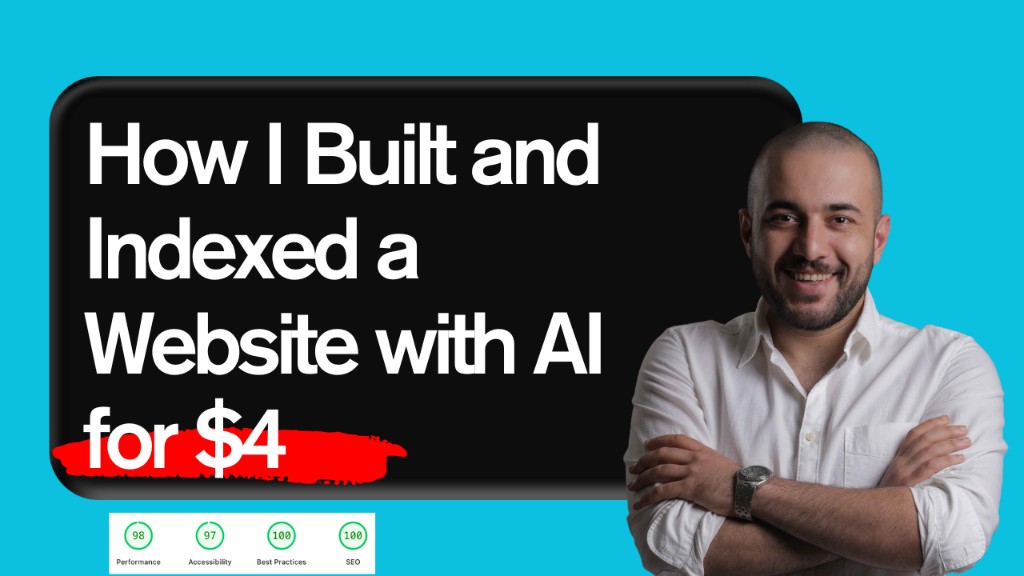
I decided to challenge that assumption. I built this website — the one you are reading right now — for exactly $4. That single expense was the domain name. Every other piece of the stack? Free. And the result is a site that scores 98 on Performance, 97 on Accessibility, 100 on Best Practices, and 100 on SEO in Google PageSpeed Insights. It is live, indexed by Google, and generating real organic traffic.
This is not a theoretical post. It is a transparent, step by step breakdown of every tool, prompt, and decision that went into that build — including the exact prompts I used, which you are free to copy.
The AI Tools Stack
Before diving into the steps, here is the full toolkit I used. Every single tool on this list has a free tier that is more than sufficient for building and launching a professional website:
- Google Stitch AI powered UI design tool for generating the initial visual design and layout
- Cursor IDE AI assisted code editor that serves as the development environment
- Claude Code (Anthropic) the AI code agent running inside Cursor that wrote the actual Astro codebase
- Astro the static site framework chosen for its exceptional SEO performance and minimal JavaScript footprint
- Cloudflare Pages free hosting platform with a global CDN, zero cold starts, and built in DDoS protection
- Resend developer first email API for transactional and marketing emails
- Google Search Console for submitting the sitemap and monitoring indexing status
The only paid item: a domain from any registrar of your choice, typically around $4–$10 per year. Everything else is genuinely free.
Step 1: Design the UI with Google Stitch
The first step was creating the visual design. Instead of opening Figma or hiring a designer, I used Google Stitch — a relatively new AI design tool from Google that generates full page UI designs based on a text prompt.
The process is straightforward: you describe your brand, your goals, and the style you want, and Stitch generates a complete visual direction including color palettes, typography, section layouts, and component designs. You can then export those designs as reference files — HTML, CSS snippets, or image exports — and hand them off to your build agent.
The key to getting a great result from Stitch is writing a detailed, structured prompt. A vague prompt like "make me a website for an SEO expert" will produce a generic result. A specific prompt that defines the brand voice, target audience, conversion goals, section structure, and visual style will produce something genuinely usable.
The Exact Stitch Prompt I Used
Below is the complete prompt I used with Google Stitch. Copy it, adapt the bracketed sections to your own brand, and you will have a strong design foundation in minutes.
🎯 Final Stitch Prompt

Create a modern, high-converting personal brand website for a digital marketing expert under the brand:

👉 "your website name"

🧠 About the Brand:

[your brand details]

🎯 Main Goal:

Design a website that converts visitors into clients by positioning Arman as:

An SEO expert who drives real traffic
A developer who builds websites that rank
A strategist who focuses on ROI, not just design

🎨 Design Style:
Modern, sleek, and premium
Inspired by SaaS and high-converting agency websites
Clean layout with strong spacing and typography
Smooth animations and micro-interactions
Primary color: [your color]
Use gradients + dark/light contrast
Subtle glow and futuristic elements

🧩 Website Structure (Long & SEO-Focused):

1. Hero Section
Headline:
👉 "[your tag line]"
Subheadline:
Explain that you build SEO-driven websites that convert
CTA: "Get Free SEO Audit" / "Start Scaling"
Visual: modern illustration or personal branding

2. Trust & Authority Section
Industries worked with (Food, Finance, E-commerce)
Short credibility statement
Optional stats (traffic growth, rankings, etc.)

3. Services Section (Conversion-Focused)

Each service must highlight outcomes:

SEO-Optimized Website Development
→ Websites built to rank and convert
Technical SEO
→ Speed, indexing, Core Web Vitals
On-Page & Content SEO
→ Keyword targeting + structure
YouTube SEO
→ Grow visibility through video

4. Portfolio Section (IMPORTANT)

Create a visually strong section including:

💻 Web Design Portfolio
Showcase websites built
Include screenshots/mockups
Short explanation of results (speed, UX, SEO-ready)

📈 SEO Portfolio
Case studies:
Traffic growth
Ranking improvements
Before/after comparisons

5. Results / Value Proposition

Add a rich, content-heavy section to improve SEO:

Include topics like:

What is SEO and why it matters
Technical SEO importance
How website structure affects ranking
Importance of content and keywords
Internal linking & UX

👉 This section should be optimized for:

Headings (H1, H2, H3)
Readability
Keyword relevance

7. Process Section

Simple and modern:

Research & Strategy
Website Build or Audit
SEO Optimization
Growth & Scaling

8. About Section

Short personal story:

Started with WordPress
Transitioned into SEO
Focus on measurable growth

9. Strong CTA Section
"Ready to Scale Your Website?"
Button: "Book a Free Consultation"

10. Footer
Clean and minimal
Contact info
Social links

⚡ Technical SEO Requirements:
Clean semantic HTML structure
Proper heading hierarchy
Fast loading (performance-first mindset)
Mobile-first design
Schema-ready structure
Optimized images and lazy loading
Internal linking strategy
SEO-friendly layout and spacing

🧩 Extra Instructions:
Make the website long-form and content-rich (important for SEO ranking)
Use persuasive copywriting (benefits > features)
Focus heavily on conversion rate optimization (CRO)
Balance design + performance (no heavy unnecessary elements)
Step 2: Build the Site with Cursor + Claude Code
Once Google Stitch produced the visual design reference, the next step was turning it into a real, production ready website. This is where Cursor IDE and Claude Code came in.
Cursor is a code editor built on top of VS Code that has deep AI integration. Claude Code is Anthropic's AI coding agent — it can read your entire codebase, understand your intent, write files, install dependencies, fix bugs, and reason through multi step implementation tasks. Together, they form what practitioners now call a "vibe coding" workflow: you describe what you want in natural language, and the AI builds it.
The framework I chose was Astro. This was a deliberate, SEO first decision — more on that in the next section. I provided Claude Code with three inputs:
- The HTML/CSS output from Google Stitch (
code.html) - A screenshot of the design (
screen.png) - A design brief document (
DESIGN.md)
Then I gave it the following prompt, which drove the entire build process from start to finish.
The Exact Code Agent Prompt
This is the complete prompt I gave to the AI code agent inside Cursor. You can use this as is for your own build — just swap in your design files.
i generated a website and add the files here
@code.html @screen.png @DESIGN.md
i want you to build that 100 % the same .
You will build this with ASTRO (https://astro.build) research all the dependencies you need to install for it.
Create a clean, scalable SEO hierarchy.
Generate optimized:


Title tags (primary keyword + location when relevant)


Meta descriptions (compelling and CTR-focused)


H1–H3 structure


SEO-friendly URL structure


Include proper internal linking and anchor strategy.


Image Optimization


Generate all images using Nada Banana Pro.


Export all images in WebP format.


Use descriptive, keyword-rich file names.


Include optimized alt text aligned with page intent.


Ensure clean code structure.


Optimize for Core Web Vitals.


Confirm the site loads quickly and runs smoothly.


Deliver:
Full sitemap structure


Page-by-page SEO breakdown


Schema examples in JSON-LD


Internal linking plan


Image naming structure


Final implementation checklist.
The agent then worked autonomously — scaffolding the Astro project, converting the design into components, implementing the SEO architecture (title tags, meta descriptions, JSON-LD schema, sitemap, image optimization), and producing a production ready codebase. The entire build took a single afternoon.
Why I Chose Astro for SEO
Framework selection is one of the most consequential decisions in a web project, and it is especially critical when SEO is a primary goal. I chose Astro for several specific technical reasons that directly impact search engine performance:
- Zero JavaScript by default: Astro ships HTML to the browser with no client side JavaScript unless you explicitly add it. This eliminates render blocking scripts, which is one of the most common causes of poor Largest Contentful Paint (LCP) scores.
- Static site generation: Pages are pre rendered at build time, producing static HTML files. Cloudflare Pages serves these files from its global edge network, resulting in sub-100ms Time to First Byte (TTFB) for most users worldwide.
- Native SEO primitives: Astro has first class support for canonical URLs, Open Graph tags, JSON-LD schema injection, and XML sitemap generation via the official
@astrojs/sitemapintegration. - Content first architecture: The framework is designed around content pages, making it natural to build a proper heading hierarchy (H1 → H2 → H3) and semantic HTML structure that search engines reward.
- Tailwind CSS integration: CSS is inlined at build time, eliminating render blocking stylesheets and reducing the number of network requests.
For content driven sites like blogs, portfolios, and service pages, Astro consistently outperforms React, Next.js, and WordPress on Core Web Vitals benchmarks. It was the obvious choice for a performance first build.
Free Hosting on Cloudflare Pages
Once the site was built and the production build was passing, I needed to deploy it. This is where the $0 hosting comes from: Cloudflare Pages.
Cloudflare Pages is a JAMstack deployment platform that connects directly to your Git repository (GitHub, GitLab, or Bitbucket). Every time you push a commit to your main branch, Cloudflare automatically triggers a new build and deployment. The entire process typically completes in under two minutes.
Here is what the free tier of Cloudflare Pages includes — and why it is more than sufficient for most websites:
- Unlimited bandwidth no traffic caps or overage fees
- 500 builds per month enough for daily deployments
- Global CDN your site is served from Cloudflare's 310+ data centers worldwide
- Automatic HTTPS free SSL certificate provisioned and renewed automatically
- Custom domain support connect your $4 domain with a single DNS configuration step
- DDoS protection enterprise grade security included at zero cost
- Serverless functions Cloudflare Workers for backend logic (used here for the contact form API)
The combination of Astro's static output and Cloudflare's edge network is, in my experience, the fastest possible stack for a content website. TTFB measurements consistently come in under 50ms from most regions.
"Hosting a fast website should not cost money. Cloudflare Pages is proof that the free tier can outperform many paid alternatives."
Getting Google to Index the Site Fast
Building the site is only half the job. Getting Google to discover, crawl, and index it — quickly and correctly — requires deliberate action. Here is the exact process I followed immediately after the first deployment:
1. Submit the XML Sitemap
Astro's @astrojs/sitemap integration automatically generates a sitemap-index.xml at build time. I submitted this URL directly in Google Search Console under Sitemaps. This tells Google exactly which URLs exist on the site and gives it priority signals (the sitemap includes priority and changefreq values for each URL type).
2. Request Indexing for the Homepage
In Google Search Console, I used the URL Inspection tool on the homepage URL and clicked "Request Indexing." This pushes the page into Google's crawl queue immediately rather than waiting for the next scheduled crawl.
3. Verify robots.txt
I confirmed that robots.txt was not accidentally blocking Googlebot. A misconfigured robots.txt is one of the most common reasons for indexing failures on new sites.
4. Implement JSON-LD Schema
Every page includes appropriate JSON-LD structured data — WebSite, Person, Service, and BlogPosting schemas. Structured data does not directly cause indexing, but it helps Google understand the content hierarchy and can accelerate the appearance of rich results in SERPs.
5. Internal Linking from Day One
I made sure every page was reachable within two clicks from the homepage. Orphaned pages — pages with no internal links pointing to them — are crawled infrequently and may never be indexed. A proper internal linking strategy is one of the most underrated technical SEO levers.
Core Web Vitals: Near Perfect Scores
The proof is in the numbers. After deployment, I ran a full PageSpeed Insights audit on the homepage. The results:
- Performance: 98 / 100 driven by Astro's zero JS architecture, WebP images, inlined CSS, and Cloudflare's edge CDN
- Accessibility: 97 / 100 semantic HTML, proper ARIA labels, sufficient color contrast, and keyboard navigable interactive elements
- Best Practices: 100 / 100 HTTPS, no deprecated APIs, secure third party origins, correct image aspect ratios
- SEO: 100 / 100 meta descriptions, canonical tags, structured data, crawlable links, and mobile friendly layout
These scores matter for three reasons. First, Core Web Vitals are a confirmed Google ranking factor — sites that pass the thresholds have a measurable ranking advantage. Second, high performance directly improves user experience, which reduces bounce rate and increases time on site. Third, a 100 SEO score signals to clients and stakeholders that the technical foundation is solid.
Achieving these scores was not luck. It was the direct result of choosing the right framework (Astro), the right hosting (Cloudflare), and letting the AI agent implement SEO best practices from the start rather than bolting them on afterward.
"When you build with SEO in mind from line one of the codebase, a 100 SEO score is the baseline — not the goal."
Free Email with Resend
A website without a way to capture and nurture leads is a missed opportunity. For email, I use Resend — a developer first email API built for transactional and marketing email delivery.
Resend was built by engineers who were frustrated with legacy platforms like Mailgun and SendGrid. The result is a tool that integrates in minutes, ships a clean REST API, and has first class support for the exact stack used here: Astro, Cloudflare Workers, and React Email.
The free plan includes everything needed to run a real email system from day one:
- 3,000 emails per month at no cost, with 100 emails per day
- Audiences and contact management with unlimited contacts on the free tier
- Transactional and broadcast emails handled from the same dashboard
- Webhooks for real time delivery events: opens, clicks, bounces, and complaints
- React Email integration for building beautiful, responsive templates in code
- DKIM, SPF, and DMARC setup guided step by step to protect deliverability from day one
- SDKs for every major language including Node.js, Python, Go, PHP, Ruby, and Rust
The contact form on this site connects to a Cloudflare Worker that calls the Resend API directly. Every form submission triggers a confirmation email to the visitor and a notification to me. The integration took about 20 lines of code and zero configuration overhead.
For anyone building a personal brand or service business website, this stack eliminates two of the largest recurring costs completely: Cloudflare for hosting, Resend for email.
Frequently Asked Questions
Can I really build a good website for $4?
Yes — if you are willing to use AI tools and free tier platforms. The $4 covers the domain name registration only. Hosting (Cloudflare Pages), the framework (Astro), the design tool (Google Stitch), the code editor (Cursor free tier), the AI agent (Claude), and the email platform (Resend) all have viable free tiers. The trade off is time investment rather than financial investment.
Do I need to know how to code to use this approach?
Basic familiarity with HTML helps, but it is not required. The AI agent (Claude Code inside Cursor) handles the majority of the actual coding. You will need to understand concepts like file structure, how to run a local development server, and how to connect a GitHub repo to Cloudflare Pages — all of which have step by step documentation. The vibe coding workflow has dramatically lowered the barrier to entry for web development.
What is "vibe coding"?
Vibe coding is a term for the workflow of describing what you want in natural language and letting an AI code agent translate that intent into working code. Instead of writing every function manually, you act as the architect and product owner — you define the requirements, review the output, test the result, and iterate. AI tools like Cursor and Claude Code have made this workflow practical for real production projects.
Why Astro and not WordPress, Webflow, or Next.js?
WordPress requires paid hosting, is vulnerable to performance issues from plugins, and typically requires optimization work to achieve good Core Web Vitals scores. Webflow has a monthly subscription fee and its export code is often unclean. Next.js ships JavaScript to the browser by default, which adds weight and complexity for content only pages. Astro's zero JS default, static output, and native SEO tooling make it the strongest choice for a performance first, SEO optimized site at zero hosting cost.
How long did the full build take?
From the first Stitch prompt to a live, indexed website: approximately one day. The design generation in Stitch took about an hour of iteration. The AI assisted Astro build took a full afternoon. Connecting Cloudflare Pages and submitting to Google Search Console took under 30 minutes. Most of the time was spent reviewing the AI's output and making refinements — not writing code manually.
How do I get started building my own site this way?
Start with the two prompts in this article. Run the Stitch prompt to get your design, then hand the output to Claude Code inside Cursor using the code agent prompt. If you want a personalized approach for your specific business or niche, book a free consultation and I will walk you through it directly.
When WordPress fits the project
A framework choice should follow your content workflow and business requirements. My Alyaf Nemoune WordPress project and Shimi Plast B2B website show another approach for multilingual industrial content. Performance and clear navigation matter whichever platform you choose.
Once the website works, review how it helps visitors act. My article on why a perfect-looking website can cost you sales explains the role of clear messaging and trust signals.
Final Thoughts: The Real Cost of a Website Is Attention, Not Money
The $4 website is not a gimmick or a corner cutting experiment. It is a demonstration of what is genuinely possible when you pair the right tools with the right strategy. The AI models available today — and the platforms built around them — have collapsed the cost of quality web development to near zero.
What the prompts and platforms cannot replace is strategic clarity. Knowing which keywords to target, how to structure your content for maximum SEO impact, how to design for conversion rather than decoration — that knowledge still determines whether a $4 website grows into a real business asset or collects digital dust.
The two prompts in this article are the foundation. Build on them, adapt them to your brand, and use them as a starting point rather than a ceiling. If you want to go deeper — whether that is a full SEO optimized website build, a technical SEO audit, or a complete growth strategy — that is what Scale With Arman is here for.
The barrier to entry has never been lower. The only question is whether you act on it.

Written by Arman
Arman is a Growth Architect and SEO specialist with over 8 years of experience helping brands scale from zero to measurable results. He focuses on data-driven systems, technical SEO, and high-performance web architecture.